Skin Analysis Online
Upload a selfie and get a visual skin map - redness, tone, texture and shine drawn over your own face - plus an honest AI read of texture, tone evenness, hydration, shine and visible photoaging signs, with what's working and where care would show most. Cosmetic observation only, not a medical assessment.
One quick check before your results
No account, no password - your results show on screen in seconds.
You can withdraw this consent and delete the data linked to your account or this browser yourself, at any time, from Delete my data.
Free, no login. The skin map is computed in your browser; the written read is processed by Google Gemini, not stored, never used for training.
What the Skin Analysis Reads
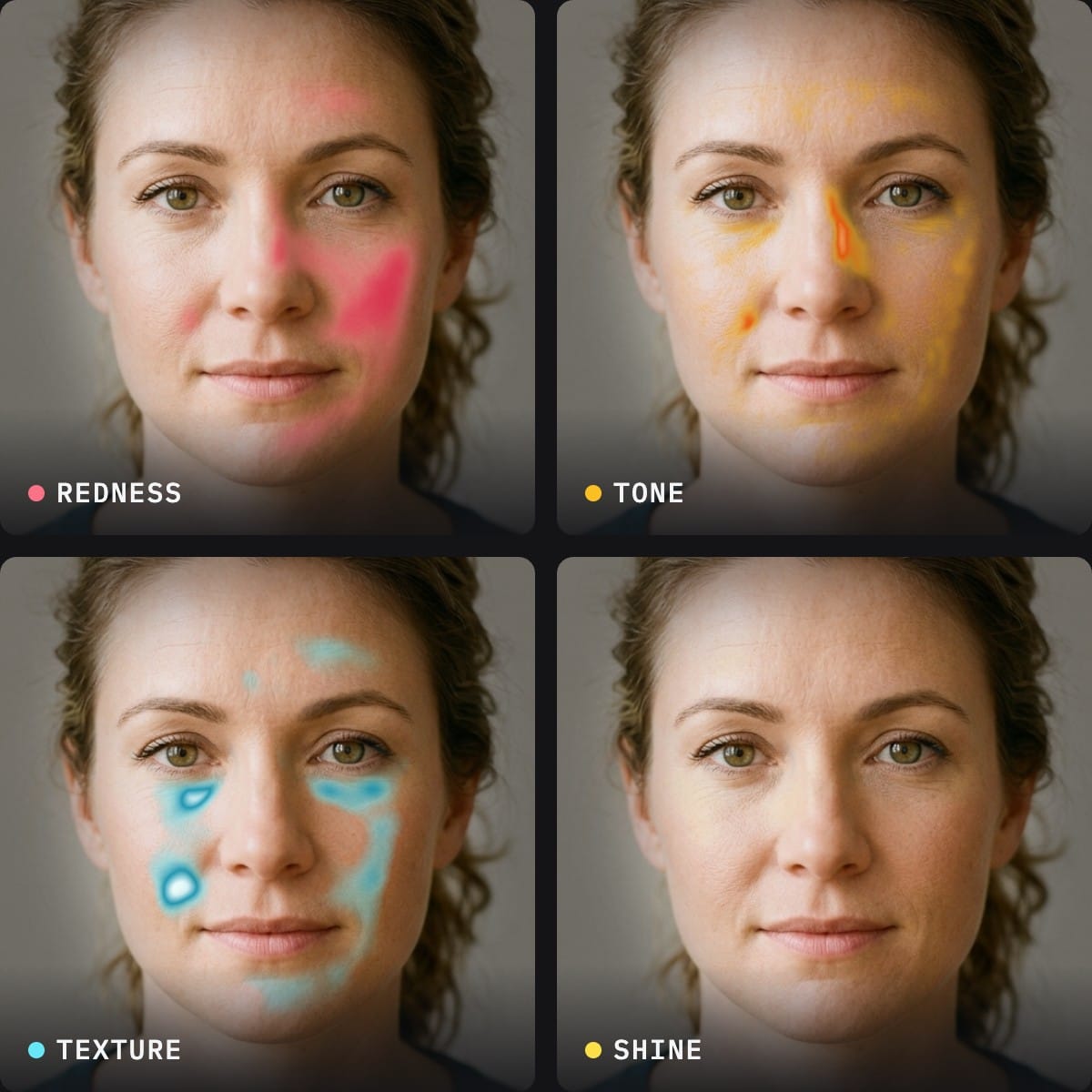
First, the skin map. Four appearance maps are drawn over your photo on your device: where your skin reads warmer than your own baseline (redness), where compact marks sit darker than the skin around them (tone), where the surface shows the most fine detail (texture), and where light bounces off it (shine). Every map is relative to your own face, so it shows where each signal concentrates on you rather than grading you against anyone else. You can share the map as a card, with or without your face.
The AI evaluates five cosmetic appearance signals, each against your own visible baseline - never against someone else's complexion:
Texture evenness
How smooth the visible skin surface reads - the signal most affected by consistent retinoid use and most exaggerated by harsh lighting.
Tone evenness
How uniform the coloring reads across the face. Sun exposure is the biggest lifetime driver of unevenness.
Apparent hydration
Whether skin reads plump and well-hydrated or dry-looking. Responds fastest to routine changes - often within days.
Shine balance
Matte, balanced, or shine-prone in this photo. Partly lighting, partly skin - the tool downweights obvious light artifacts.
Visible photoaging signs
Fine lines and sun-related texture changes visible at photo resolution. Around 80% of visible facial aging is photoaging - which means it's largely preventable with daily SPF.
What This Is - and Isn't
This is a cosmetic appearance read: the kind of honest assessment a makeup artist or aesthetician makes by looking at your skin. It is deliberately not a medical tool - it never names skin conditions, never grades severity, and is no substitute for a dermatologist. A clinic-grade analysis (like a VISIA session) photographs your face under controlled multi-spectral lighting and sees sub-surface detail a selfie can't; if this tool's read prompts questions, that - or a dermatologist - is the proper next step. What a free selfie read does well: an unbiased baseline, and a clear answer to "where would care effort actually show?"
Frequently Asked Questions
What is the skin map and how is it made?
The skin map is four overlays drawn on your own photo: redness, tone, texture and shine. It is computed in your browser from the photo's colour and detail, using a face mesh to keep eyes, brows, lips and hair out of the read. Each map compares every point of your skin to your own face's baseline, so it shows where a signal concentrates on you. It never grades you against other people and it is not a medical image.
Can I share the skin map without showing my face?
Yes. The share card has a 'Hide my face' option that replaces your photo with a plain silhouette while keeping the maps readable. The card also carries a link back to the free tool so friends can map their own skin.
How does the free online skin analysis work?
Upload one clear, unfiltered selfie and vision AI reads five cosmetic appearance signals: texture evenness, tone evenness, apparent hydration, shine, and visible photoaging signs - plus your visible strengths and the areas most worth focusing care on. It's the same kind of read a makeup artist does before an event: cosmetic observation of what's visible in the photo, scored against your own baseline rather than anyone else's complexion.
Is this a dermatologist-level skin analysis?
No, and we're explicit about that. This tool describes cosmetic appearance only - it never names medical conditions, never grades severity, and is not a diagnosis or a substitute for seeing a dermatologist. If you have a skin concern that hurts, changes, bleeds, or worries you, see a qualified clinician. What this tool is good for: an honest, unbiased read of how your skin presents in photos, and where cosmetic care effort would be most visible.
How is this different from a VISIA skin analysis?
VISIA is a clinic machine that photographs your face under multiple controlled light modes (including UV) to quantify sub-surface features - it's genuinely more thorough and typically offered during paid consultations at med spas and dermatology offices. This tool works from one ordinary selfie in your browser, free, in seconds. Think of it as the accessible first read: if it flags something you want measured properly, a clinic session is the upgrade path.
Does my photo get stored?
Your photo is sent to Google's Gemini vision model for the analysis and is not stored on our servers or used for AI training. This is different from our landmark-based tools (face shape, symmetry), which run entirely in your browser - reading skin texture and tone genuinely requires a vision model to see the photo, so it leaves your device temporarily for processing.
Why does my result change between photos?
Because the photo changes, not your skin. Lighting is the biggest factor - harsh overhead light exaggerates texture and shadows; warm indoor light shifts apparent tone; front-facing daylight is most accurate. Filters and beauty modes smooth texture artificially, and makeup covers the signals entirely (the tool will flag heavy makeup as a quality issue rather than pretend to read through it). For the most useful read: soft daylight, no filter, minimal or no makeup.
What should I do with my results?
Use the focus areas to direct effort where it's most visible. The evidence-based core for almost everyone: daily SPF (sun exposure drives most visible photoaging), a retinoid at night for texture, and consistent moisturization for hydration and shine balance. The full Face Report goes further - it ties your skin read into a personalized plan alongside your complete facial analysis, with a prioritized first-72-hours list and a four-week protocol.
Related Tools and Guides
How Old Do I Look?
Skin condition is the #1 driver of perceived age - see where you land
How to Glow Up
The evidence-based skincare routine that does 80% of the work
Personal Color Analysis
Your 12-season palette from the same selfie
Complete Face Report
Skin read + 40 measurements + personalized 4-week plan